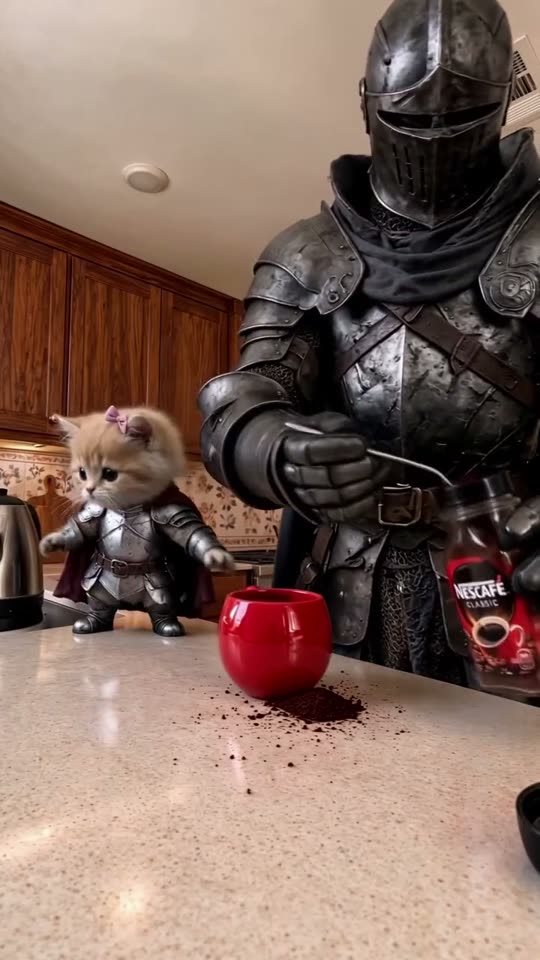
One red mug, two unlikely baristas
A knight and kitten perform the routine. Source: @amb_ai_studio.
 Coffee Making AIMake a coffee video
Two photos. One red mug. 10 or 15 seconds of coffee chaos.
Cast yourself, your pets or your favorite characters. We keep the kitchen routine; you choose the duo.
Attributed trend references. Your own result will appear here after rendering.
The scene
Updated 2 November 2026
Coffee Making AI puts two subjects into one kitchen comedy. The main character works the spoon; the other watches from the left. Grounds miss the mug, milk spills, and the pair surveys the mess. Coffee Making AI keeps the prepared routine in one take.
Cast a friend, pets, toys or characters. Coffee Making AI supplies the action, camera and kitchen; you supply the duo. The joke is a serious expression meeting an unreasonable mess. Coffee Making AI results vary, so inspect the finished clip.
Watch the routine
Explore attributed creator references for the coffee-comedy routine. Compare the characters, expressions and movement, then set up your own duo with Coffee Making AI. Completed Coffee Making AI videos appear in your private library.
A knight and kitten perform the routine. Source: @amb_ai_studio.
French bulldogs try the same routine. Source: @frenchiebles.
Max and Tilda take over the counter. Source: @maxboerboeldog, via MakeMeme.
Your next take
Upload two JPEG, PNG or WebP images, up to 10 MB each. In Coffee Making AI, photo 1 takes the main role behind the mug; photo 2 takes the left position. Use one clear subject per image. Coffee Making AI preserves this order all the way to the model.
Choose 10 or 15 seconds, then 480p, 720p or 1080p. Review the displayed Coffee Making AI cost. The prepared Coffee Making AI prompt supplies the setting, timing and roles. Confirm permission for both photos and sign in.
Follow your Coffee Making AI task from queued to ready in your private library. Check both identities, clothing, anatomy and the milk splash, then download the MP4 and share your coffee comedy.
The details
Coffee Making AI keeps the counter-height camera, wooden cabinets, red mug, kettle and milk jug. Its prompt requests whole-body replacement. Coffee Making AI render time depends on the provider queue.
PAY FOR WHAT YOU MAKE
Coffee Making AI packs: 50 credits for $9.90, 100 for $19.90 or 160 for $29.90. Coffee Making AI uses 20/45/80 credits for 10s or 30/68/120 for 15s at 480p/720p/1080p. Buy once; no subscription.
10-second videos. Credits per render:
50 credits
$9.90USD · one-time payment
480p uses 20 credits per 10-second video.
10 credits left. Not enough for another 10-second 480p video.
100 credits
$19.90USD · one-time payment
720p uses 45 credits per 10-second video.
10 credits left. Not enough for another 10-second 720p video.
160 credits
$29.90USD · one-time payment
720p uses 45 credits per 10-second video.
25 credits left. Not enough for another 10-second 720p video.
Credits never expire. Only confirmed failed or canceled tasks automatically return their deducted credits; queued or unconfirmed submissions are not failures. Completely unused packs qualify for a full refund within 7 days of purchase; partly used packs are not refundable. Refund policy
Before you upload
Give Coffee Making AI sharp, evenly lit photos. Show a person’s face and clothing, a pet’s markings and paws, or a toy’s shape and material. Coffee Making AI requests those details throughout the scene. Avoid group photos and cropped faces.
Coffee Making AI keeps the roles separate: photo 1 works the mug; photo 2 watches. Pets keep paws, plush toys keep fabric. Inspect each Coffee Making AI result. Technical failures restore credits; uncertain submissions need review before retrying.
Compare Coffee Making AI workflowsGOOD QUESTIONS. STRAIGHT ANSWERS.
Coffee Making AI uses credits for personalized videos, without a signup gift. Choose a one-time Coffee Making AI credit pack, then spend credits at your selected quality. Your balance stays in your account for future videos, and unused credits do not expire.
Coffee Making AI uses 20/45/80 credits for 10s or 30/68/120 for 15s at 480p/720p/1080p. Coffee Making AI packs cost $9.90, $19.90 or $29.90, paid once with no subscription.
Yes. Coffee Making AI requires photo 1 for the main role and photo 2 for the left role. Each Coffee Making AI upload needs one clear subject. We never silently duplicate one image across both roles.
Yes. Coffee Making AI requests the whole subject: cats keep paws, plush stays soft, blocky figures keep their shape. Coffee Making AI adapts movement without inheriting armor or human hands from the reference.
Choose 10 seconds or 15 seconds. Coffee Making AI keeps the water, spilled coffee, mug lift, milk puddle and final look in one continuous take. Each Coffee Making AI duration has its own timing.
Coffee Making AI specifies identity, clothes and separate anatomy, but exact likeness and timing are not guaranteed. Give Coffee Making AI clear photos. Check for drift, merged features or leftover armor before posting.
Technical failures restore credits. Uncertain Coffee Making AI submissions stay for review to avoid duplicate charges. Check the original task. For Coffee Making AI support, email support@coffeemakingai.app with the identifier; purchase terms are on the refund page.
Upload two photos and choose length and quality. Coffee Making AI supplies the reference and prompt. Photo 1 is the main role; photo 2 is the left partner. Coffee Making AI keeps the kitchen routine for your duo.
Two photos. One red mug. Choose 10 or 15 seconds.